IP Pools
IP pools define the IP address ranges your subscribers use. Each pool is linked to a network device, and the system assigns IPs from these pools when subscribers connect — whether via PPPoE, Static IP, Hotspot, DHCP, or device management.
Go to Devices → IP Pools in the sidebar.
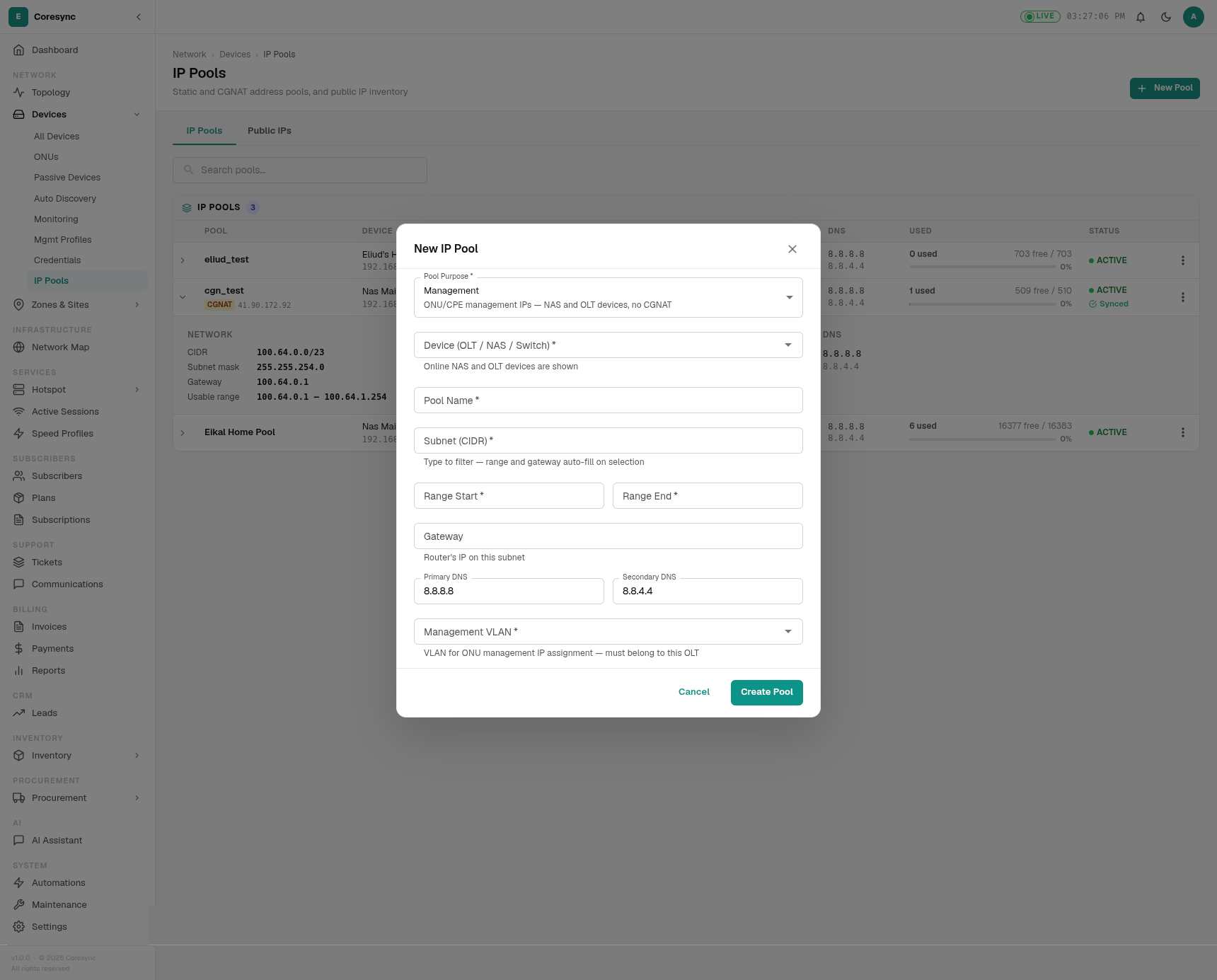
Pool Purposes
When you create a pool, you first pick its purpose. This determines where and how the IPs are used:
| Purpose | Used for |
|---|---|
| Management | ONU/CPE management IPs — NAS and OLT devices only, no public NAT |
| Static | Static IP assignments for subscribers |
| PPPoE | IPs handed out to PPPoE subscribers via RADIUS |
| Hotspot | IPs for hotspot / captive portal users |
| DHCP | IPs for DHCP clients |
Creating an IP Pool
Click New IP Pool and fill in:
| Field | What to enter |
|---|---|
| Pool Purpose | Select from the five types above |
| Router / NAS Device | The device that manages this pool |
| Pool Name | A descriptive name (e.g. "Kileleshwa-Static-Pool") |
| Target Subscribers | Optional — enter a count and the subnet auto-sizes to cover at least double that number |
| Subnet (CIDR) | The subnet, e.g. 192.168.88.0/24. Gateway and range auto-fill on selection |
| Range Start / End | First and last assignable IP in the subnet |
| Gateway | The router's IP on this subnet |
| Interface | The router interface this pool is attached to (auto-detected) |
| Block Allocation | For non-CGNAT pools: /30 (ISP standard, 4 addresses per block) or /32 (single address, directly routed) |
| Primary / Secondary DNS | DNS servers handed out to clients (defaults to 8.8.8.8 / 8.8.4.4) |
CGNAT Pools
CGNAT (Carrier-Grade NAT) lets many subscribers share a single public IP address. The system uses the 100.64.0.0/10 range (RFC 6598) — these are reserved for ISP internal use and never conflict with public internet addresses.
How CGNAT Works
- Subscribers get a private IP from the
100.64.x.xrange - Their traffic is NATed behind one or more public IPs you register on the device
- Multiple public IPs are sliced across the subnet deterministically — each subscriber always exits the same public IP
Setting Up CGNAT
When you enter a subnet in the 100.64.x.x range, the dialog shows:
- CGNAT public IP target(s) — pick the public IPs registered on the device that this pool will NAT behind. You must register public IPs on the device first.
- Check on router — verifies whether a pool with this name already exists on the device
- Push pool + NAT rule to router on save — provisions the pool and src-nat rule directly to the router
Auto-sizing
Enter a number in Target Subscribers — the system automatically picks a CGNAT subnet large enough for double that count. For 500 subscribers, it auto-selects a /22 subnet.
Management Pools
Management pools are for ONU and CPE device management IPs. When you select Management as the purpose:
- Only NAS and OLT devices are shown (no routers)
- No CGNAT, no public IPs — these are internal management addresses
- You pick a Management VLAN from the device's configured VLAN list
- Subnet suggestions exclude
100.64.x.xranges
Public IPs
Before a CGNAT pool can use public IPs as NAT targets, you must register them on the device. Go to the device's detail page and add public IPs under its Public IPs tab. Once registered, they appear in the CGNAT target dropdown when creating a pool.
Editing and Deleting
- Edit — expand or shrink a pool's range if there are unused IPs at either end. You cannot change the subnet of a pool with active assignments.
- Delete — only if no IPs in the pool are currently assigned.
Warning
The subnet, gateway, and IP range must be consistent. An incorrect gateway will prevent subscribers from reaching the internet.