Sequences
Sequences control how every reference number is generated in the system — subscriber codes, invoice numbers, ticket numbers, payment references, and more.
Go to Settings → Sequences in the sidebar.
Sequence Types
Six types are available. Each has its own pattern — configure them independently.
| Sequence | What it generates |
|---|---|
| Subscriber Code | Unique account number for each new subscriber |
| Ticket | Reference number for support tickets |
| Payment | Transaction reference for payments |
| Invoice | Invoice number |
| Purchase Order | PO number for inventory and procurement |
| Lead | Reference number for sales leads |
Pattern Tokens
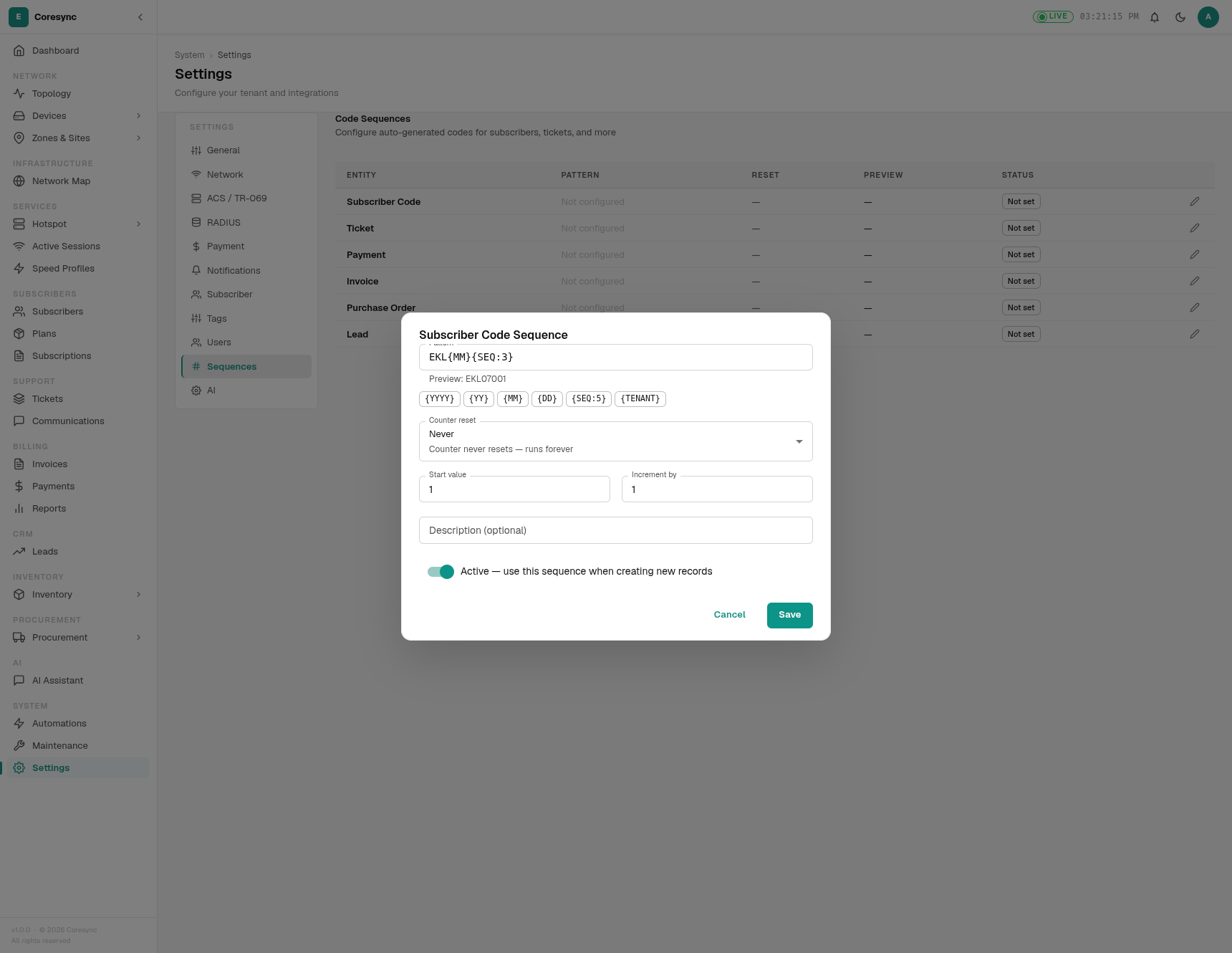
When you click on a sequence type, the dialog shows the available tokens right there. Build your pattern using any combination:
| Token | What it inserts | Example output |
|---|---|---|
{YYYY} |
Current year (4 digits) | 2026 |
{YY} |
Current year (2 digits) | 26 |
{MM} |
Current month (2 digits) | 07 |
{DD} |
Current day (2 digits) | 12 |
{TENANT} |
Your organisation code (uppercase) | UPNET |
{SEQ:n} |
Sequential number, padded to n digits | {SEQ:3} gives 001, {SEQ:6} gives 000042 |
You can mix tokens and plain text in any order. Use the Preview button to see what the next code will look like before saving.
Pattern Examples
| Pattern | Result |
|---|---|
SUB-{SEQ:6} |
SUB-000042 |
EKL{MM}{SEQ:3} |
EKL07001 |
TKT-{YY}{MM}-{SEQ:4} |
TKT-2607-0042 |
INV/{YYYY}/{SEQ:5} |
INV/2026/00042 |
PO-{TENANT}-{SEQ:4} |
PO-UPNET-0042 |
Counter Reset
Counter Reset controls whether your sequence numbers start over at a certain interval. Think of it like a numbering notebook — do you keep writing in the same notebook forever, or do you start a fresh one each month?
Never
The counter keeps going up and never resets. Use this when every record needs a unique number forever.
Example: Subscriber codes. If your last subscriber was EKL-0042, the next is EKL-0043, then EKL-0044 — forever.
Monthly
The counter restarts from the start value on the 1st of each month. The system keeps a separate counter for each month, so January and February each have their own sequence.
Example: INV-{YY}{MM}-{SEQ:4} with Monthly reset. Your January invoices go INV-2601-0001 through INV-2601-0042. On February 1st, the counter resets and invoices start again at INV-2602-0001.
Yearly
The counter restarts on January 1st each year.
Example: PO-{YYYY}-{SEQ:4} with Yearly reset. Purchase orders in 2026 go PO-2026-0001, PO-2026-0002... On January 1st 2027, the counter resets to PO-2027-0001.
Daily
The counter restarts each day. Useful when the date is part of your code and you want short daily sequences.
Example: TKT-{YY}{MM}{DD}-{SEQ:3} with Daily reset. Tickets created on July 12 start at TKT-260712-001. Tomorrow, the counter restarts at TKT-260713-001.
Choosing the Right Reset
| If you want... | Use |
|---|---|
| Every record forever unique, no resets | Never |
| Numbers that restart each month (invoices) | Monthly |
| Numbers that restart each year (POs) | Yearly |
| Numbers that restart each day (tickets) | Daily |
How to Create a Sequence
Click on a sequence type to open its configuration dialog, then fill in:
| Field | What to enter |
|---|---|
| Pattern | Your code format using the tokens above |
| Counter Reset | Never, Monthly, Yearly, or Daily |
| Start Value | The first number (usually 1) |
| Increment By | How much the number goes up each time (usually 1) |
| Active | Toggle on — the system uses this sequence when creating new records |
| Description | Optional note for yourself |
Worked Example — Subscriber Code
You want account numbers like EKL07001, EKL07002 — company prefix EKL, month included, 3-digit sequence:
| Field | Value |
|---|---|
| Pattern | EKL{MM}{SEQ:3} |
| Counter Reset | Never |
| Start Value | 1 |
| Increment By | 1 |
| Active | On |
Preview shows: EKL07001. The first subscriber in July gets EKL07001, the second gets EKL07002. In August the month token changes automatically, so you get EKL08001 onward.
Warning
Changing a sequence pattern does not rename existing codes — it only affects new records going forward.